
fate is a modern data client for the web inspired by Relay and GraphQL. It combines view composition, normalized caching, data masking, Async React features, and type-safe data fetching.
Features
- View Composition: Components declare their data requirements using co-located "views". Views are composed into a single request per screen, minimizing network requests and eliminating waterfalls.
- Normalized Cache: fate maintains a normalized cache for all fetched data. This enables efficient data updates through actions and mutations and avoids stale or duplicated data.
- Data Masking & Strict Selection: fate enforces strict data selection for each view, and masks (hides) data that components did not request. This prevents accidental coupling between components and reduces overfetching.
- Async React: fate uses modern Async React features like Actions, Suspense, and
useto support concurrent rendering and enable a seamless user experience. - Lists & Pagination: fate provides built-in support for connection-style lists with cursor-based pagination, making it easy to implement infinite scrolling and "load-more" functionality.
- Optimistic Updates: fate supports declarative optimistic updates for mutations, allowing the UI to update immediately while the server request is in-flight. If the request fails, the cache and its associated views are rolled back to their previous state.
- Live Views: fate can keep individual view refs up to date through a single native Server-Sent Events stream, merging updates into the normalized cache.
- AI-Ready: fate's minimal, predictable API and explicit data selection enable local reasoning, enabling humans and AI tools to generate stable, type-safe data-fetching code.
A modern data client for the web
fate is designed to make data fetching and state management in React applications more composable, declarative, and predictable. The framework has a minimal API, no DSL, and no magic—it's just JavaScript.
GraphQL and Relay introduced several novel ideas: fragments co‑located with components, a normalized cache keyed by global identifiers, and a compiler that hoists fragments into a single network request. These innovations made it possible to build large applications where data requirements are modular and self‑contained.
Nakazawa Tech builds apps and games primarily with GraphQL and Relay. We advocate for these technologies in talks and provide templates (server, client) to help developers get started quickly.
However, GraphQL comes with its own type system and query language. If you are already using tRPC or another type‑safe RPC framework, it's a significant investment to adopt and implement GraphQL on the backend. This investment often prevents teams from adopting Relay on the frontend.
Many React data frameworks lack Relay's ergonomics, especially fragment composition, co-located data requirements, predictable caching, and deep integration with modern React features. Optimistic updates usually require manually managing keys and imperative data updates, which is error-prone and tedious.
fate takes the great ideas from Relay and applies them to plain TypeScript data fetching. You get type safety between the client and server, a native protocol with optional adapters such as tRPC, and GraphQL-like ergonomics for data fetching. Using fate usually looks like this:
export const PostView = view<Post>()({
  author: UserView,
  content: true,
  id: true,
  title: true,
});

export const PostCard = ({ post: postRef }: { post: ViewRef<'Post'> }) => {
  const post = useView(PostView, postRef);

  return (
    <Card>
      <h2>{post.title}</h2>
      <p>{post.content}</p>
      <UserCard user={post.author} />
    </Card>
  );
};
Learn more about fate's core concepts or create an app from one of the templates.
Getting Started
Create a new fate app from a template, or install it in an existing React or Vue project. For an overview of the ideas behind fate, read Why fate?.
Template
Create a new fate app with Vite+:
vp create fateExplore the fate stack to see the tools included in your new project.
Choose a backend in the template selector: Void, tRPC with Drizzle or Prisma, GraphQL with Prisma, or a client for an existing GraphQL server. React is the default; choose Vue in the selector or pass --framework vue.
Manual Installation
For a React client, install react-fate. It requires React 19.2+:
npm add react-fatepnpm add react-fateyarn add react-fateFor a Vue client, install vue-fate:
npm add vue-fatepnpm add vue-fateyarn add vue-fateIf your server is a separate package, install @nkzw/fate there as a runtime dependency too. Install @nkzw/fate on the client only for a barebones integration without a framework adapter:
npm add @nkzw/fatepnpm add @nkzw/fateyarn add @nkzw/fateCore Concepts
fate has a minimal API surface and is aimed at reducing data fetching complexity.
Thinking in Views
In fate, each component declares the data it needs using views. Views are composed upward through the component tree until they reach a root, where the actual request is made. fate fetches all required data in a single request. React Suspense manages loading states, and any data-fetching errors naturally bubble up to React error boundaries. This eliminates the need for imperative loading logic or manual error handling.
Traditionally, React apps are built with components and hooks. fate introduces a third primitive: views – a declarative way for components to express their data requirements. An app built with fate looks more like this:
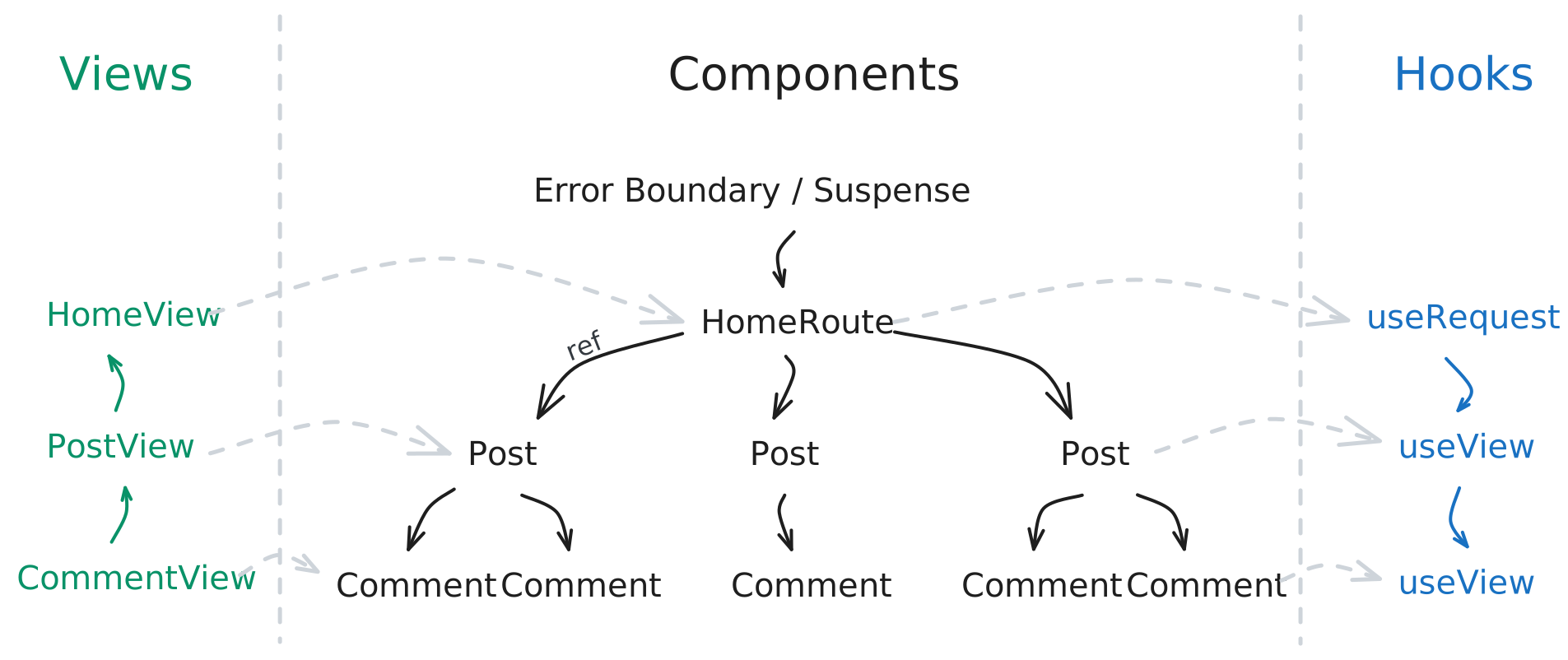
With fate, you no longer worry about when to fetch data, how to coordinate loading states, or how to handle errors imperatively. You avoid overfetching, stop passing unnecessary data down the tree, and eliminate boilerplate types created solely for passing server data to child components.
NOTE
Views in fate are what fragments are in GraphQL.
Views
Defining Views
Let's start by defining a simple view for a blog's Post component. fate requires you to explicitly "select" each field that you plan to use in your components. Here is how you can define a view for a Post entity that has title and content fields:
import type { Post } from '@your-org/server/views';
import { view } from 'react-fate';

export const PostView = view<Post>()({
  content: true,
  id: true,
  title: true,
});
Fields are selected by setting them to true in the view definition. This tells fate that these fields should be fetched from the server and made available to components that use this view.
Resolving a View with useView
Now we can use the view that we defined in a PostCard React component to resolve the data against a reference of an individual Post:
import { useView, ViewRef } from 'react-fate';

export const PostCard = ({ post: postRef }: { post: ViewRef<'Post'> }) => {
  const post = useView(PostView, postRef);

  return (
    <Card>
      <h2>{post.title}</h2>
      <p>{post.content}</p>
    </Card>
  );
};
A ViewRef refers to a specific object, for example a Post with ID 7. fate creates these references for you so you can pass them to child components.
Components using useView listen to changes for all selected fields. When data changes, fate re-renders all of the fields that depend on that data. For example, if the title of the Post changes, the PostCard component re-renders with new data. However, if a different field such as likes that isn't selected in PostView changes, the PostCard component will not re-render.
Fetching Data with useRequest
Now that we defined our view and component, we fetch the data from the server using the useRequest hook from fate. This hook allows us to declare what data we need for a specific screen or component tree. At the root of our app, we can request a list of posts like this:
import { useRequest } from 'react-fate';
import { PostCard, PostView } from './PostCard.tsx';

export function App() {
  const { posts } = useRequest({ posts: { list: PostView } });

  return posts.map((post) => <PostCard key={post.id} post={post} />);
}
Learn more about useRequest in the Requests Guide.
Composing Views
In the above example we are defining a single view for a Post. One of fate's core strengths is view composition. Let's say we want to show the author's name along with the post. A simple way to do this is by adding an author field to the PostView with a concrete selection:
import { Suspense } from 'react';
import { useView, ViewRef } from 'react-fate';

export const PostView = view<Post>()({
  author: {
    id: true,
    name: true,
  },
  content: true,
  id: true,
  title: true,
});

const PostCard = ({ postRef }: { postRef: ViewRef<'Post'> }) => {
  const post = useView(PostView, postRef);
  return (
    <Card>
      <h2>{post.title}</h2>
      <p>by {post.author.name}</p>
      <p>{post.content}</p>
    </Card>
  );
};
This code fetches the author associated with the Post and makes it available to the PostCard component. However, this approach has some downsides:
- The
authorselection is tightly coupled to thePostView. If we want to use the author's data in another component, we would need to duplicate the field selection. - If the
authorhas more fields that we want to use in other components, we would need to add them to thePostView, leading to overfetching. - We cannot reuse the
authorfield selection in other views or components.
In fate, views are composable and reusable. Instead of inlining the selection, we can define a UserView and compose it into the PostView like this:
import type { Post, User } from '@your-org/server/views';
import { view } from 'react-fate';

export const UserView = view<User>()({
  id: true,
  name: true,
  profilePicture: true,
});

export const PostView = view<Post>()({
  author: UserView,
  content: true,
  id: true,
  title: true,
});
Now we can create a separate UserCard component that uses our UserView:
import { useView, ViewRef } from 'react-fate';

export const UserCard = ({ user: userRef }: { user: ViewRef<'User'> }) => {
  const user = useView(UserView, userRef);

  return (
    <div>
      <img src={user.profilePicture} alt={user.name} />
      <p>{user.name}</p>
    </div>
  );
};
And update PostCard to use our UserCard component:
import { UserCard } from './UserCard.tsx';

export const PostCard = ({ post: postRef }: { post: ViewRef<'Post'> }) => {
  const post = useView(PostView, postRef);

  return (
    <Card>
      <h2>{post.title}</h2>
      <UserCard user={post.author} />
      <p>{post.content}</p>
    </Card>
  );
};
View Spreads
When building complex UIs, you will often build multiple components that share the same data requirements. In fate, you can use view spreads to compose such views together. This is similar to GraphQL fragment spreads, but works with plain JavaScript objects.
Let's assume we want to fetch and display additional information about the author in the PostCard, such as their bio. Instead of directly assigning our UserView to the author field, we can instead spread it and add the bio field:
export const PostView = view<Post>()({
  author: {
    ...UserView,
    bio: true,
  },
  content: true,
  id: true,
  title: true,
});
Now the PostCard component can access the bio field of the author:
export const PostCard = ({ post: postRef }: { post: ViewRef<'Post'> }) => {
  const post = useView(PostView, postRef);

  return (
    <Card>
      <h2>{post.title}</h2>
      <UserCard author={post.author} />
      {/* Accessing the bio field */}
      <p>{post.author.bio}</p>
      <p>{post.content}</p>
    </Card>
  );
};
We can also spread multiple views together. For example, if we have another view called UserStatsView that selects some statistics about the user, we can include it in the PostView like this:
export const UserStatsView = view<User>()({
  followerCount: true,
  postCount: true,
});

export const PostView = view<Post>()({
  author: {
    ...UserView,
    ...UserStatsView,
    bio: true,
  },
  content: true,
  id: true,
  title: true,
});
Views are opaque objects. Even if you select the same field multiple times through different views, the composed object won't have conflicting fields or result in TypeScript errors. fate automatically deduplicates fields during runtime and ensures that each field is only fetched once.
Resolving Multiple Refs with useViews
Use useViews when a component needs selected data from an array of refs, for example to filter or sort a list before rendering it:
import { useViews, type ViewRef } from 'react-fate';

function PostTitles({ posts: postRefs }: { posts: ReadonlyArray<ViewRef<'Post'>> }) {
  const posts = useViews(PostView, postRefs);
  const sorted = [...posts].sort((a, b) => a.title.localeCompare(b.title));

  return sorted.map((post) => <h2 key={post.id}>{post.title}</h2>);
}
Call useViews once with the whole array instead of calling useView inside a loop. Results follow the input order and update when selected fields change. Like useView, the hook suspends while data is loading and sends read errors to the nearest error boundary.
The array can change between renders. Deferred refs are supported, and null or undefined entries keep their values in the result.
Vue provides the same API as a reactive resource. See Resolving Arrays of Refs in Vue.
useView and Suspense
We learned that useRequest is responsible for fetching data from the server and useView is used for reading data from the cache. In some situations data may not be available in the cache and useView might need to suspend the component to fetch only the missing data. Once that data is fetched and written to the cache, the component resumes rendering.
Tip: You can test this behavior in development mode with Fast Refresh (HMR) enabled in your bundler. When you edit the selection of a view, components using that view will suspend, fetch the missing data, and then resume rendering.
Type Safety and Data Masking
fate provides guarantees through TypeScript and during runtime that prevent you from accessing data that wasn't selected in a component. This ensures that you declare all the data dependencies at the right level in your component tree, and prevents accidental coupling between components.
In the below example, we forgot to select the content of a Post. As a result, type-checks fail and the content field is undefined during runtime:
const PostView = view<Post>()({
  id: true,
  title: true,
  // `content: true` is omitted.
});

const PostCard = ({ post: postRef }: { post: ViewRef<'Post'> }) => {
  const post = useView(PostView, postRef);

  return (
    <Card>
      <h2>{post.title}</h2>
      {/* TypeScript errors here, and `post.content` is undefined during runtime */}
      <p>{post.content}</p>
    </Card>
  );
};
Views can only be resolved against refs that include that view directly or via view spreads. If a component tries to resolve a view against a ref that isn't linked, it will throw an error during runtime:
const PostDetailView = view<Post>()({
  content: true,
});

const AnotherPostView = view<Post>()({
  content: true,
});

const PostView = view<Post>()({
  id: true,
  title: true,
  ...AnotherPostView,
});

const PostCard = ({ post: postRef }: { post: ViewRef<'Post'> }) => {
  const post = useView(PostView, postRef);
  return <PostDetail post={post} />;
};

const PostDetail = ({ post: postRef }: { post: ViewRef<'Post'> }) => {
  // This throws because the post reference passed into this component
  // is of type `AnotherPostView`, not `PostDetailView`.
  const post = useView(PostDetailView, postRef);
};
Parameters and Conditional Selections
A view can take parameters. Define the selection with a function, then bind its parameters where you request or compose the view:
import type { User } from '@your-org/server/views';
import { alias, useRequest, useView, view, when, type ViewRef } from 'react-fate';

const AccountView = view<User>()({ email: true });

const ProfileView = view<User>()(({ isViewer }: { isViewer: boolean }) => ({
  name: true,
  account: when(isViewer, alias(AccountView)),
}));

function Profile({ userId, isViewer }: { userId: string; isViewer: boolean }) {
  const { user } = useRequest({
    user: { id: userId, view: ProfileView({ isViewer }) },
  });
  const profile = useView(ProfileView, user);
  const account = useView(AccountView, profile.account);

  return (
    <div>
      <h2>{profile.name}</h2>
      {account && <p>{account.email}</p>}
    </div>
  );
}
alias(AccountView) gives us an account ref to the same user. It doesn't require an account field on the server. Read it with useView, just like any other ref.
when(condition, selection) works with named fragments and ordinary fields:
const ProfileView = view<User>()(({ isViewer }: { isViewer: boolean }) => ({
  name: true,
  email: when(isViewer, true),
}));
When the condition is false, the field is undefined and isn't fetched. useView and useLiveView accept that undefined ref, so you can call them unconditionally, as above.
Carrying Parameters with Refs
Bindings travel with refs. Child components read the view definition without reconstructing its parameters:
const LocalizedNameView = view<User>()(({ locale }: { locale: string }) => ({
  name: { args: { locale } },
}));

const NamesView = view<User>()({
  english: alias(LocalizedNameView({ locale: 'en' })),
  japanese: alias(LocalizedNameView({ locale: 'ja' })),
});

function Names({ user }: { user: ViewRef<'User'> }) {
  const names = useView(NamesView, user);
  const english = useView(LocalizedNameView, names.english);
  const japanese = useView(LocalizedNameView, names.japanese);

  return (
    <p>
      {english.name} / {japanese.name}
    </p>
  );
}
Here name accepts a locale argument on the server. Both refs point to the same user, but each keeps its own parameters.
Define views outside components, then pass parameters when composing or requesting them. No useMemo is needed. Use named aliases when you need several versions of the same view, or when(condition, alias(View)) to include one conditionally.
Vue
The same view, alias, and when API is available from vue-fate. Pass reactive refs or getters to the view composables:
const profile = useView(ProfileView, () => request.value?.user);
const account = useView(AccountView, () => profile.value?.account);
An undefined ref produces an undefined value without fetching.
Requests
Requesting Lists
The useRequest hook can be used to declare our data needs for a specific screen or component tree. At the root of our app, we can request a list of posts like this:
import { useRequest } from 'react-fate';
import { PostCard, PostView } from './PostCard.tsx';

export function App() {
  const { posts } = useRequest({ posts: { list: PostView } });
  return posts.map((post) => <PostCard key={post.id} post={post} />);
}
This component suspends or throws errors, which bubble up to the nearest error boundary. Wrap your component tree with ErrorBoundary and Suspense components to show error and loading states:
<ErrorBoundary FallbackComponent={ErrorComponent}>
  <Suspense fallback={<div>Loading…</div>}>
    <App />
  </Suspense>
</ErrorBoundary>
NOTE
fate batches requests made together. With tRPC, configure HTTP Batch Link to send them in one network request.
Requesting Objects by ID
If you want to fetch data for a single object instead of a list, you can specify the id and the associated view like this:
const { post } = useRequest({
  post: { id: '12', view: PostView },
});
If you want to fetch multiple objects by their IDs, you can use the ids field:
const { posts } = useRequest({
  posts: { ids: ['6', '7'], view: PostView },
});
Other Types of Requests
For queries such as the current user, use the root name and a view:
const { viewer } = useRequest({
  viewer: { view: UserView },
});
Request Arguments
You can pass arguments to useRequest calls. This is useful for pagination, filtering, or sorting. For example, to fetch the first 10 posts, you can do the following:
const { posts } = useRequest({
  posts: {
    args: { first: 10 },
    list: PostView,
  },
});
Lists with different filters or sorting arguments stay separate. Loading another page extends the same list. Views that select the same objects share their cached data, and fate fetches any missing fields.
Request Modes
useRequest supports different request modes to control caching and data freshness. The available modes are:
cache-first(default): Returns data from the cache if available, otherwise fetches from the network.stale-while-revalidate: Returns data from the cache and simultaneously fetches fresh data from the network.network-only: Always fetches data from the network, bypassing the cache.cache-only(React): Observes cached data without fetching or suspending. Returnsundefinedwhen the selection is missing.
You can pass the request mode as an option to useRequest:
const { posts } = useRequest(
  {
    posts: { list: PostView },
  },
  {
    mode: 'stale-while-revalidate',
  },
);
For screens that also work offline, switch the same hook to cache-only:
const result = useRequest(
  { viewer: { view: ViewerView } },
  { mode: isOnline ? 'network-only' : 'cache-only' },
);
const viewer = useView(ViewerView, result?.viewer);
Cache-only results stay subscribed to cache changes. Their references never fetch missing view fields. Switching offline bypasses a pending Suspense gate immediately, so the component can keep its local state and render its offline UI. The existing network modes keep their required result type; modes that can be cache-only return an optional result.
Refreshing Requests
To refresh posts already displayed by useRequest, call useRefetch with the same request:
import { useRefetch } from 'react-fate';
import { PostView } from './PostCard.tsx';

export function RefreshButton() {
  const refetch = useRefetch({ posts: { list: PostView } });

  return <button onClick={() => refetch().catch(reportError)}>Refresh posts</button>;
}
refetch() fetches fresh data while the current posts stay visible. Its promise resolves with the new result or rejects on failure. Replace reportError with your app's error handler. Vue has the same refresh API.
Timeouts and Cancellation
You can limit how long a request waits by passing a timeout in milliseconds:
const { posts } = useRequest({ posts: { list: PostView } }, { timeout: 10_000 });Requests have no timeout by default. A timeout raises a TimeoutError, which useRequest sends to your error boundary. Retrying starts a new timeout.
To cancel a request, pass an AbortSignal and call abort() when the result is no longer needed:
const controller = new AbortController();
const request = client.request({ posts: { list: PostView } }, { signal: controller.signal });

controller.abort();

try {
  await request;
} catch (error) {
  // Handle cancellation or a failed request.
}
Cancellation rejects with signal.reason, usually an AbortError. If callers share a request, cancelling one does not cancel the others.
You can also use timeout and signal with useRefetch and Vue requests. Keep the signal stable when passing it to a hook. These options apply to the request, including its background refresh, rather than later pagination or mutation calls.
Cache Lifetime
fate keeps a screen's data in memory while its useRequest is mounted. After you leave, it keeps the 10 most recently released requests so navigating back can reuse their data.
You can change that number when creating the client:
const fate = createClient({
  gcReleaseBufferSize: 20,
  roots,
  transport,
  types,
});
Set gcReleaseBufferSize to 0 to release data as soon as a screen unmounts. If data has been collected, the next request fetches it again.
Outside a component, use retain when you need to keep a request's data in memory:
const request = { posts: { list: PostView } };
const retained = fate.retain(request);

try {
  const { posts } = await fate.request(request);
  // Use posts while this request is retained.
} finally {
  retained.dispose();
}
SSR and Hydration
Create a separate fate client for each server request and load the route's data before rendering:
const fate = createFateClient();
await fate.request({ post: { id: '12', view: PostView } });

return {
  fate: fate.dehydrate(),
};
Pass the snapshot through your framework's loader or server component props. In the browser, hydrate the client before rendering:
const fate = createFateClient();
fate.hydrate(loaderData.fate);

hydrateRoot(
  document,
  <FateClient client={fate}>
    <App />
  </FateClient>,
);
cache-first requests can now use the server's data without refetching. Await preloading before calling dehydrate, and hydrate before starting browser requests.
Generated clients set a hydration scope automatically. When creating a client manually, set hydrationScope and change it when deploying incompatible data models:
const fate = createClient({
  hydrationScope: 'storefront-v2',
  // ...
});
By default, hydration adds missing data and preserves values already in the browser cache. To replace existing values with the snapshot instead, pass merge: 'replace':
fate.hydrate(loaderData.fate, { merge: 'replace' });Snapshots from different hydration scopes cannot be combined. Keep each user's server client and snapshot separate.
Observing Request State
Outside React or Vue components, fate.observeRequest(request, options) provides request state through getSnapshot() and subscribe(listener):
const observer = fate.observeRequest(request, { mode: 'stale-while-revalidate' });
const unsubscribe = observer.subscribe(() => {
  console.log(observer.getSnapshot());
});

// Stop observing when the consumer is disposed.
unsubscribe();
The snapshot contains data, error, isFetching, status, and refetch. Data contains the same refs as useRequest. During a refresh, cached data stays available and isFetching is true. A failed refresh sets error and keeps the previous data.
Reading a snapshot does not start a request. The first subscription starts an enabled request and retains its data; the last unsubscribe releases it. Use enabled: false to disable fetching, or mode: 'cache-only' to observe cached data without fetching missing fields. The possible statuses are:
| Status | Meaning |
|---|---|
disabled | The request is not enabled. |
missing | A cache-only request needs data that isn't cached. |
pending | The initial request is loading. |
ready | Data is available. |
error | The initial request failed. |
observer.getSnapshot().refetch() returns a promise and requires an enabled request that isn't cache-only. Handle its rejected promise in the calling code.
Aliases
Use alias(sourceField, selection) to select one schema field under multiple result names, with independent arguments:
const GamesView = view<User>()({
  activeGames: alias('games', {
    args: { first: 20, status: 'Active' },
    items: { node: GameView },
    pagination: { hasNext: true, nextCursor: true },
  }),
  waitingGames: alias('games', {
    args: { first: 20, status: 'Waiting' },
    items: { node: GameView },
  }),
  displayName: alias('name', true),
});

const request = { currentUser: alias('viewer', { view: GamesView }) };
The result uses the names you choose, while fate keeps data with the same source field and arguments shared in the cache. Different filters keep separate lists and pagination. id and __typename cannot be used as alias names.
GraphQL can request these variants in one operation. Other transports may make separate reads. Selecting multiple argument variants in a single mutation currently requires a transport with native alias support, such as GraphQL.
Deferred Views
Let's say a post's comments take longer to load than its title and content. Wrap comments in defer so the post can render first, and give the comments their own Suspense boundary:
import { Suspense } from 'react';
import { defer, useListView, useView, view, Deferred, ViewRef } from 'react-fate';

const CommentView = view<Comment>()({
  content: true,
  id: true,
});

const CommentConnectionView = {
  args: { first: 3 },
  items: { node: CommentView },
};

const PostView = view<Post>()({
  comments: defer(CommentConnectionView),
  content: true,
  id: true,
  title: true,
});

function PostCard({ post: postRef }: { post: ViewRef<'Post'> }) {
  const post = useView(PostView, postRef);

  return (
    <article>
      <h2>{post.title}</h2>
      <p>{post.content}</p>
      <Suspense fallback={<CommentsSkeleton />}>
        <PostComments comments={post.comments} />
      </Suspense>
    </article>
  );
}

function PostComments({
  comments,
}: {
  comments: Deferred<{ items: ReadonlyArray<{ node: ViewRef<'Comment'> }> }>;
}) {
  const [items, loadNext] = useListView(CommentConnectionView, comments);

  return (
    <section>
      {items.map(({ node }) => (
        <CommentCard comment={node} key={node.id} />
      ))}
      {loadNext ? <button onClick={loadNext}>Load more</button> : null}
    </section>
  );
}
title and content are available when useView(PostView, postRef) returns. Reading the comments with useListView loads any missing data and suspends only PostComments.
useView and useLiveListView can read deferred values too. This works with every transport. GraphQL currently fetches deferred fields with separate queries, rather than streaming @defer responses.
List Views
Pagination with useListView
You can wrap a list of references using useListView to enable connection-style lists with pagination support.
For example, you can define a CommentView and reuse it inside of a CommentConnectionView:
import { useListView, ViewRef } from 'react-fate';

const CommentView = view<Comment>()({
  content: true,
  id: true,
});

const CommentConnectionView = {
  args: { first: 10 },
  items: {
    node: CommentView,
  },
};

const PostView = view<Post>()({
  comments: CommentConnectionView,
});
Now you can apply the useListView hook inside of your PostCard component to read the list of comments and load more comments when needed:
export function PostCard({ detail, post: postRef }: { detail?: boolean; post: ViewRef<'Post'> }) {
  const post = useView(PostView, postRef);
  const [comments, loadNext] = useListView(CommentConnectionView, post.comments);

  return (
    <div>
      {comments.map(({ node }) => (
        <CommentCard comment={node} key={node.id} post={post} />
      ))}
      {loadNext ? (
        <Button onClick={loadNext} variant="ghost">
          Load more comments
        </Button>
      ) : null}
    </div>
  );
}
If loadNext is null, it means there are no more comments to load. If you want to instead load previous comments, you can use the third argument returned by useListView, which is loadPrevious. Similarly, if there are no previous comments to load, loadPrevious will be null.
When the connection is null or undefined, the returned items are undefined and both pagination functions are null. Default the items when the UI should render an empty list:
const [comments = [], loadNext] = useListView(CommentConnectionView, post?.comments);useLiveListView follows the same rules.
Pagination Arguments
Connection views can define default arguments, and useListView carries those arguments forward when loading more pages:
const CommentConnectionView = {
  args: { first: 10 },
  items: {
    cursor: true,
    node: CommentView,
  },
  pagination: {
    hasNext: true,
    hasPrevious: true,
    nextCursor: true,
    previousCursor: true,
  },
};
When loadNext runs, fate sends the next cursor as after and keeps the page size in first. When loadPrevious runs, fate sends the previous cursor as before and uses last for the page size. This lets the server distinguish forward and backward pagination while keeping the component API small.
Loading another page adds items to the list. Refreshing the query without after or before replaces the loaded list with the latest result, including removed items or an empty list. This applies to nested connections as well as root lists. A failed page load can be retried.
Additional arguments on a root request are scoped to that root list:
const { posts } = useRequest({
  posts: {
    args: { categoryId: category.id, first: 20 },
    list: PostConnectionView,
  },
});
The categoryId list above has its own cache entry and pagination state. Loading another page for that list does not update a different posts request with another category or search query.
Updating Lists with Mutations
When a mutation returns a complete list, fate replaces that list's items. For example, if a mutation returns all of a post's comments without a removed comment, that comment disappears from the list. If the mutation returns only one page, fate keeps previously loaded items outside that page. Removing a comment from a list does not delete its record from the cache.
Live Views
Use useLiveView to keep a view up to date when its data changes on the server:
import { useLiveView, ViewRef } from 'react-fate';

export const PostCard = ({ post: postRef }: { post: ViewRef<'Post'> }) => {
  const post = useLiveView(PostView, postRef);

  return (
    <Card>
      <h2>{post.title}</h2>
      {/* Updates automatically! */}
      <p>{post.likes} likes</p>
    </Card>
  );
};
It takes the same view and ref as useView. Only the selected fields are available, and components update when those fields change.
How Live Updates Work
fate uses one live connection per client, shared by its mounted live views. When the server sends an update, fate writes it to the cache and updates components that select the changed fields.
For example, a change to likes updates PostCard without re-rendering a component that only selects title. Deleting an object also removes references to it from lists and other objects.
Client Setup
Configure the native transport and point the client at your fate endpoint:
import { FateClient } from 'react-fate';
import { createFateClient } from 'react-fate/client';

export function App() {
  const fate = useMemo(
    () =>
      createFateClient({
        fetch: (input, init) =>
          fetch(input, {
            ...init,
            credentials: 'include',
          }),
        url: `${env('SERVER_URL')}/fate`,
      }),
    [],
  );

  return <FateClient client={fate}>{/* Components go here */}</FateClient>;
}
This example uses native HTTP. For a GraphQL server, see GraphQL Live Views.
Server Setup
Pass an event bus to createFateServer so your mutations can tell fate which objects changed:
import { createFateServer, createHonoFateHandler, createLiveEventBus } from '@nkzw/fate/server';
import type { AppContext } from './context.ts';
import { sources } from './sources.ts';
import { Root } from './views.ts';

export const live = createLiveEventBus();

export const fate = createFateServer<AppContext>({
  live,
  roots: Root,
  sources,
});

app.all('/fate/*', createHonoFateHandler(fate));
If a client falls behind, fate closes its connection after 1,000 queued events. You can change the limit with maxQueueSize:
export const fate = createFateServer<AppContext>({
  live: {
    bus: live,
    maxQueueSize: 500,
  },
  roots: Root,
  sources,
});
Once this is in place, components can switch from useView to useLiveView without changing their view definitions or return types.
Live List Views
useLiveListView mirrors useListView, but subscribes to live connection events for the connection it receives:
import { useLiveListView, useLiveView, ViewRef } from 'react-fate';

export function PostCard({ post: postRef }: { post: ViewRef<'Post'> }) {
  const post = useLiveView(PostView, postRef);
  const [comments, loadNext] = useLiveListView(CommentConnectionView, post.comments);

  return (
    <>
      {comments.map(({ node }) => (
        <CommentCard comment={node} key={node.id} />
      ))}
      {loadNext ? <button onClick={loadNext}>Load more</button> : null}
    </>
  );
}
The hook returns the same tuple as useListView: items, loadNext, and loadPrevious. Live events append, prepend, insert, or delete edges from one connection without deleting the underlying records.
By default, new items at an unloaded end of a list wait for pagination. For a chat or activity feed, use append: 'visible' to show new messages immediately:
const MessageConnectionView = {
  args: { first: 30 },
  items: {
    node: MessageView,
  },
  live: {
    append: 'visible',
  },
};
Emit connection events on the server when list membership changes:
live.connection('Post.comments', { id: postId }).prependNode('Comment', comment.id);
live.connection('Post.comments', { id: postId }).deleteEdge('Comment', comment.id);
For root lists, use the generated root procedure name:
live.connection('posts', { categoryId }).prependNode('Post', post.id);If the changed list cannot be described precisely, invalidate the active connection and fate will refetch it:
live.connection('posts', { categoryId }).invalidate();Pass the list's filters, such as categoryId, when emitting events. Pagination arguments like first and after don't affect which list receives an event.
Emitting Events
After a mutation changes an object, emit an update event for that object:
export const postRouter = router({
  ...fate.procedures({
    view: postDataView,
  }),
  like: procedure.input(likeInput).mutation(async ({ ctx, input }) => {
    const post = await ctx.prisma.post.update({
      data: {
        likes: {
          increment: 1,
        },
      },
      where: { id: input.id },
    });

    live.update('Post', input.id);

    return post;
  }),
});
This tells fate that the Post changed. Every active live view for that post refreshes using the selection it subscribed with.
If you know which fields changed, pass them with changed to reduce the amount of data sent to each subscriber:
live.update('Post', input.id, { changed: ['likes'] });With this version, a live view that selected likes refreshes only likes, while a live view that only selected unrelated fields is skipped entirely.
If a mutation changes a related object, emit for the object whose live view should refresh. For example, adding a comment usually changes the post's commentCount and comments list, so emit for the Post:
export const commentRouter = router({
  add: procedure.input(addCommentInput).mutation(async ({ ctx, input }) => {
    const comment = await ctx.prisma.comment.create({
      data: {
        content: input.content,
        postId: input.postId,
      },
    });

    live.update('Post', input.postId, { changed: ['commentCount', 'comments'] });

    return comment;
  }),
});
For deletions, emit a delete event for the deleted object if clients may be subscribed to it:
live.delete('Comment', input.id);If deleting the object also changes another object, emit an update for that object too:
live.update('Post', postId, { changed: ['commentCount', 'comments'] });You can pass an eventId when emitting. fate sends it on the native SSE event and includes the last received event ID when it resubscribes after a reconnect:
live.update('Post', input.id, {
  changed: ['likes'],
  eventId: `post:${input.id}:${Date.now()}`,
});
The default event bus doesn't replay missed events after a disconnect. For that, provide a custom live bus that resumes from lastEventId.
Error Handling
Live errors leave the last cached data visible. Pass onLiveError to report them to your logger or monitoring system:
const fate = createFateClient({
  fetch: (input, init) =>
    fetch(input, {
      ...init,
      credentials: 'include',
    }),
  onLiveError(error) {
    captureException(error);
  },
  url: `${env('SERVER_URL')}/fate`,
});
These errors don't go to the component's error boundary.
Actions
fate does not provide hooks for mutations like traditional data fetching libraries do. Instead, mutations are exposed in two ways:
fate.actionsfor use withuseActionStateand React Actions.fate.mutationsfor traditional imperative mutation calls.
fate's Vite plugin makes your server mutations available on the client. The API works the same way with native HTTP, tRPC, GraphQL, and Void.
If you have a mutation named post.like, a LikeButton component using fate Actions and an async component library could look like this:
import { useActionState } from 'react';
import { useFateClient } from 'react-fate';

const LikeButton = ({ post }: { post: { id: string; likes: number } }) => {
  const fate = useFateClient();
  const [result, like] = useActionState(fate.actions.post.like, null);

  return (
    <Button action={() => like({ input: { id: post.id } })}>
      {result?.error ? 'Oops!' : 'Like'}
    </Button>
  );
};
If you are not using an async component library, you can use React's useTransition to start the action in a transition:
const LikeButton = ({ post }: { post: { id: string; likes: number } }) => {
  const fate = useFateClient();
  const [, startTransition] = useTransition();
  const [result, like, isPending] = useActionState(fate.actions.post.like, null);

  return (
    <button
      disabled={isPending}
      onClick={() => {
        startTransition(() =>
          like({
            input: { id: post.id },
          }),
        );
      }}
    >
      {result?.error ? 'Oops!' : 'Like'}
    </button>
  );
};
Optimistic Updates
To update the like count before the server responds, pass an optimistic object:
like({
  input: { id: post.id },
  optimistic: { likes: post.likes + 1 },
});
Views that select likes update immediately. Views that only select other fields, such as title, do not re-render. If the mutation fails, fate rolls back the optimistic update.
Inserting New Objects
Let's add a comment to a post. Pass the comments list as insert.into and give the optimistic comment a temporary ID:
const content = 'New Comment text';
addComment({
  input: { content, postId: post.id },
  insert: { into: post.comments, position: 'after' },
  optimistic: {
    author: { id: user.id, name: user.name },
    content,
    id: `optimistic:${Date.now().toString(36)}`,
    post: { commentCount: post.commentCount + 1, id: post.id },
  },
});
The comment appears immediately. When the server responds, fate replaces the temporary ID with the real one. If the mutation fails, the comment disappears and the count is restored.
Use position: 'before' for a newest-first list. Without insert, fate updates existing records but does not add them to lists. See Controlling List Insertion Behavior for deferred lists and inserting into more than one list.
Selecting a View with Actions
Mutations may change data that is not directly specified in the mutation result. For example, adding a comment increases the post's comment count. For such cases, you can provide a view to an action that specifies which fields to fetch as part of the mutation:
addComment({
  input: { content: 'New Comment text', postId: post.id },
  view: view<Comment>()({
    ...CommentView,
    post: { commentCount: true },
  }),
});
The server returns the selected fields, and views that display the post's comment count update automatically.
Use .with() before useActionState to include selected fields in state.result:
const [state, addComment] = useActionState(fate.actions.comment.add.with(CommentView), null);Pass a view or a raw selection. Chaining .with() adds fields to the existing selection, for example .with(CommentView).with({ post: { commentCount: true } }).
Mutations
Use fate.mutations to call a mutation outside a React Action, or when calls should run without waiting for earlier actions to finish:
const result = await fate.mutations.comment.add({
  input: { content, postId: post.id },
});
The options are the same as for Actions, including optimistic, insert, and view. The call returns a promise; handle pending state and errors in the calling code.
Mutation Server Implementation
Define mutations in your backend and return the fields requested by the client. See Server Integration for native HTTP and tRPC, GraphQL Integration for an existing GraphQL API, or Void Integration for a Void app.
Action & Mutation Error Handling
Expected errors, such as a validation failure or a 404, are returned in result.error. You can show a message next to the button or form:
const [result, deletePost] = useActionState(fate.actions.post.delete, null);

if (result?.error) {
  return <p>Could not delete this post. Please try again.</p>;
}
Network failures, server errors, and authentication or authorization errors are thrown. React Actions send them to the nearest error boundary:
<ErrorBoundary FallbackComponent={ErrorComponent}>
  <Suspense fallback={<div>Loading…</div>}>
    <PostPage postId={postId} />
  </Suspense>
</ErrorBoundary>
When calling fate.mutations directly, use try/catch to handle thrown errors. Both kinds of failure roll back optimistic updates. GraphQL error codes are described in Errors and Partial Results.
Deleting Records
Pass delete: true to remove an object immediately. fate also removes it from lists that contain it and restores it if the mutation fails:
const [result, deleteAction] = useActionState(fate.actions.post.delete, null);

deleteAction({
  input: { id: post.id },
  delete: true,
});
Resetting Action State
To clear an action's result without sending another mutation, dispatch 'reset' inside a transition:
import { startTransition, useActionState } from 'react';

const [result, like] = useActionState(fate.actions.post.like, null);

const dismiss = () => startTransition(() => like('reset'));
Controlling List Insertion Behavior
Choose which list should receive a new object with insert. For example, comments can be deferred and still used directly as an insertion target:
const PostCommentsView = view<Post>()({
  comments: defer({
    args: { first: 20 },
    items: { node: CommentView },
  }),
  id: true,
});

// Inside a component that receives postRef:
const post = useView(PostCommentsView, postRef);

const addComment = () =>
  fate.mutations.comment.add({
    input: { content: 'New Comment text', postId: post.id },
    insert: { into: post.comments, position: 'after' },
    optimistic: {
      content: 'New Comment text',
      id: 'optimistic:new-comment',
    },
    view: CommentView,
  });
Passing post.comments does not fetch the comments. If they haven't loaded yet, fate keeps the insertion until they do. You can also pass a resolved array or connection from a request or view. Use the original value from the same client, rather than a copied or filtered array.
Use an array of insertion objects to update multiple lists, with an independent position for each:
await fate.mutations.comment.add({
  input: { content, postId: post.id },
  insert: [
    { into: post.comments, position: 'after' },
    { into: recentComments, position: 'before' },
  ],
  view: CommentView,
});
Only the named lists receive the new comment. Filters and sorting are still your app's choice: use before or after to match how each list is ordered. An object already in a list is updated without being duplicated or moved.
Insertions work with pagination, optimistic updates, and offline mutations. Appended comments stay after later pages as they load; prepended comments stay before earlier pages.
Migrating from automatic insertion
Earlier versions appended mutation results automatically. Add an insert option to calls that relied on that behavior. The strings 'before' and 'after' still enable automatic list matching, but prefer an explicit target. 'none' is now the default.
Persistence
fate can keep data across page reloads and save mutations while a user is offline. When they come back, their views can show previously loaded data and their pending changes continue where they left off.
Client Setup
For a browser app, install the IndexedDB adapter:
vp add @nkzw/fate-indexeddbThen pass persistence when creating the client:
import { createIndexedDBStorage } from '@nkzw/fate-indexeddb';
import { createPersistence } from '@nkzw/fate/persistence';
import { createFateClient } from 'react-fate/client';

const fate = createFateClient({
  persistence: createPersistence({
    key: `workspace:${workspaceId}:user:${userId}`,
    storage: createIndexedDBStorage(),
  }),
  url: '/api/fate',
});
By default, fate saves loaded data for one day, with a storage budget of 25 MiB. Use maxAge (milliseconds) and maxBytes to change those defaults:
persistence: createPersistence({
  key: `workspace:${workspaceId}:user:${userId}`,
  maxAge: 3 * 24 * 60 * 60 * 1000,
  maxBytes: 50 * 1024 * 1024,
  storage: createIndexedDBStorage(),
}),
Create the client after you know which user is signed in. Use a different key for each account and workspace, matching the authenticated scope in your server setup. When switching accounts, dispose the old persistence session and create a new client.
NOTE
Persistence saves data. To load the app itself while offline, you'll also need a service worker for its HTML, JavaScript, and other assets.
Cache Lifetime
You can keep a screen's data longer by passing persist to its request. For example, to save posts for three days:
const { posts } = useRequest(
  {
    posts: { list: PostView },
  },
  {
    persist: { maxAge: 3 * 24 * 60 * 60 * 1000 },
  },
);
The same option works with fate.request(...) and Vue's useRequest. Objects shared by several requests are saved once, and remain available while a saved request needs them.
maxAge starts when data is fetched successfully. Reading saved data does not extend it. Pass persist: { maxAge: 0 } to skip saving a request; other requests may still save data they share with it.
Saved data can outlive the in-memory cache. fate loads it when a request needs it, rather than restoring the whole cache at startup.
Refreshing Data
Keeping data for three days doesn't mean waiting three days for updates. Request modes still control when to fetch fresh data. For example, to show saved posts immediately and refresh them in the background:
const { posts } = useRequest(
  {
    posts: { list: PostView },
  },
  {
    mode: 'stale-while-revalidate',
    persist: { maxAge: 3 * 24 * 60 * 60 * 1000 },
  },
);
Use cache-first to fetch only missing data, or network-only to require a fresh response. Expiration affects saved data, not data already displayed by a mounted view. See Request Modes and Live Views.
Cache Size
When storage reaches maxBytes, fate removes expired data and the least recently used saved requests. Shared objects remain available while another saved request needs them.
Pending mutations are never evicted to make room for cached data. If a new mutation cannot fit, it fails before being applied optimistically or sent to the server. Already accepted mutations can still finish, even if their saved results temporarily exceed the budget.
Actions & Mutations
With persistence configured, fate saves mutations before applying their optimistic updates or sending them to the server. The API is the same as for regular Actions:
const [result, like] = useActionState(fate.actions.post.like, null);

like({
  input: { id: post.id },
  optimistic: { likes: post.likes + 1 },
});
If the user likes a post while offline, the count updates immediately. Reloading restores the pending action and its optimistic update. When the connection returns and the app is running, fate sends it to the server.
Mutations are delivered in the order they were saved, one at a time per persistence key. Tabs sharing a key coordinate delivery. Temporary failures are retried. Authentication failures wait for the user to sign in again. A terminal client error rolls back the optimistic update.
The mutation promise stays pending until confirmation, which can take until the user is back online. After a reload, use Persistence State to show pending or failed changes.
Skipping Persistence
For a call that should not be saved or retried, pass persist: false:
await fate.mutations.analytics.record({
  input: { event: 'opened-settings' },
  persist: false,
});
The same option works with fate.actions.
Creating Objects Offline
Use client-generated IDs when creating objects that later offline mutations depend on. For example, creating a comment and then editing it can use the same ID for both calls.
If the server assigns IDs, wait for the creation result before sending a dependent mutation. fate does not rewrite IDs inside mutation inputs or cancel later mutations when a creation fails.
Inputs and optimistic updates must be serializable. Functions, streams, and File objects cannot be queued. For uploads, save the content first and queue a reference to it, or use persist: false.
Server Deduplication
A connection can fail after the server has applied a mutation. Retrying a lost response must not increment a like count twice.
fate gives each saved mutation an identity and reuses it on retries. Your server must save the result and the database changes in the same transaction, then return that result if the mutation arrives again.
For the native HTTP transport, use createMutationIdempotency:
import { createMutationIdempotency } from '@nkzw/fate/persistence/server';
import { createFateServer } from '@nkzw/fate/server';

const server = createFateServer({
  // ...roots, sources, mutations, context...
  idempotency: createMutationIdempotency({
    scope: (ctx) => `workspace:${ctx.workspace.id}:user:${ctx.user.id}`,
    store: {
      transaction: (ctx, scope, id, run) =>
        database.transaction(async (tx) => {
          await lockMutationIdentity(tx, scope, id);
          return run({
            context: { ...ctx, db: tx },
            read: () => readReceipt(tx, scope, id),
            write: (receipt) => insertReceipt(tx, scope, id, receipt),
          });
        }),
    },
  }),
});
Your app supplies the database and receipt helpers. Lock each (scope, id) across server processes, and use ctx.db for mutation writes so they share the receipt's transaction. See the complete SQLite example.
Keep receipts for as long as an offline client might retry. For effects outside the database, such as payments or emails, use the destination's idempotency support and a transactional outbox.
tRPC, GraphQL, and Custom Transports
For other transports, provide mutateDurably(name, input, select, identity) with the same server deduplication. One option is to use a native fate endpoint alongside your existing backend:
const durableHTTP = createHTTPTransport<MyAPI>({
  url: '/api/fate',
});

const fate = createFateClient({
  // ...your generated tRPC or GraphQL client options...
  persistence: createPersistence({ key: accountKey, storage: createIndexedDBStorage() }),
  mutateDurably: durableHTTP.mutateDurably,
});
Use the same authentication, mutation names, inputs, results, and IDs on both endpoints. A GraphQL adapter must decode global IDs and return the unwrapped result. It also receives selected field arguments as a fifth parameter; forward them when needed.
You can use the idempotency helper inside an existing resolver too:
return idempotency.execute({
  ctx,
  identity: input.identity,
  input: input.update,
  name: 'post.update',
  select: input.select,
  resolve: (transactionContext) => updatePost(transactionContext, input.update),
});
Forward the entire identity on every attempt. When identity.replayOnly is true, the endpoint must return the saved result or a 404 without running the mutation. createMutationIdempotency handles this for you.
Without a durable adapter, saved reads and persist: false calls still work, but new durable mutations fail before being queued.
For GraphQL, return a standard extensions.code or numeric extensions.http.status for terminal client errors. Unrecognized execution errors remain retryable for saved mutations.
Persistence State
Use fate.persistence to observe pending changes and storage errors:
const session = fate.persistence!;
await session.ready;

const unsubscribe = session.subscribe(() => {
  const { status, error, mutations } = session.getSnapshot();
  // Show pending changes or report a storage error.
});
Each mutation exposes its ID, name, input, status (queued, sending, or failed), and last error. getSnapshot() also works with React's useSyncExternalStore.
A failed initial restore rejects ready. Storage errors appear in the snapshot. A cache read failure can fall back to the network, but a mutation that cannot be saved is not sent.
Read-cache writes are batched. Before a reload you control, call flush() to save the latest data:
await session.flush();
window.location.reload();
Mutations are saved automatically before delivery. You can retry delivery or discard an unsent or failed mutation:
session.retry();
await session.discard(mutationId);
retry() respects the retry delay. Once a mutation has been attempted, it cannot be discarded until its outcome is known: it may have committed on the server.
When leaving an account, dispose its session and unsubscribe:
session.dispose();
unsubscribe();
Disposal stops delivery and removes optimistic updates from memory. Saved mutations remain available to the next client using the same key.
Clearing Saved Data
To remove the saved read cache, call clearCache():
await fate.persistence!.clearCache();This leaves in-memory data and queued mutations intact.
Change hydrationScope when deploying incompatible data models or mutation inputs. Incompatible saved reads are discarded; incompatible queued mutations remain visible as failures so the app can handle them.
Other Storage Backends
To use storage other than IndexedDB, implement PersistenceStorage:
interface PersistenceStorage {
  read(key: string): Promise<unknown>;
  scan(
    prefix: string,
    after?: string,
    limit?: number,
  ): Promise<Array<{ key: string; value: unknown }>>;
  writeBatch(entries: ReadonlyArray<readonly [string, unknown]>): Promise<void>;
  exclusive<T>(key: string, run: () => Promise<T>): Promise<T>;
  subscribe?(key: string, listener: () => void): () => void;
}
Values can be stored as JSON. scan returns keys in ascending order after the optional cursor, up to the limit (64 by default). writeBatch must commit all entries atomically; undefined deletes a key.
exclusive coordinates tabs or processes sharing storage. Different lock names must be independent and allow nesting. subscribe notifies other clients after a write commits; without it, clients check during delivery and explicit retries.
The IndexedDB adapter requires a secure browser context with Web Locks. Browser storage can be cleared or evicted, so choose another backend if your app needs stronger retention.
Persistence coordinates delivery across tabs. Use refetching or Live Views to receive fresh server data.
Vue
fate supports Vue through vue-fate, with the same views, requests, cache, and mutations as the React adapter. Request and view composables expose reactive Vue resources, with <Suspense> support for loading states.
Installation
Install vue-fate in your Vue client:
npm add vue-fatepnpm add vue-fateyarn add vue-fateIf your server lives in a separate package, install @nkzw/fate there as a runtime dependency too.
Vite Plugin
Use the Vue adapter's Vite plugin in the client app:
import vue from '@vitejs/plugin-vue';
import { defineConfig } from 'vite';
import { fate } from 'vue-fate/vite';

export default defineConfig({
  plugins: [
    vue(),
    fate({
      module: '@your-org/server/fate.ts',
      transport: 'native',
    }),
  ],
});
The plugin generates vue-fate/client, which contains the typed createFateClient helper for your app. The module and transport options are the same options used by the React adapter.
Providing the Client
Create a client with createFateClient and provide it with FateClient:
<script setup lang="ts">
import { computed, ref } from 'vue';
import { FateClient } from 'vue-fate';
import { createFateClient } from 'vue-fate/client';
import AppRoutes from './AppRoutes.vue';

const token = ref<string | null>(null);

const fate = computed(() =>
  createFateClient({
    headers: () => ({
      authorization: token.value ? `Bearer ${token.value}` : '',
    }),
    url: '/fate',
  }),
);
</script>

<template>
  <FateClient :client="fate">
    <Suspense>
      <AppRoutes />
    </Suspense>
  </FateClient>
</template>
The client prop accepts a plain client, a ref, a computed value, or a getter. Descendants always read the current client, so switching credentials, endpoints, or transports does not require remounting the provider.
You can also install the client as a Vue plugin:
import { createApp } from 'vue';
import { createFatePlugin } from 'vue-fate';
import { createFateClient } from 'vue-fate/client';
import App from './App.vue';

const fate = createFateClient({ url: '/fate' });

createApp(App).use(createFatePlugin(fate)).mount('#app');
Defining Views
Views are plain TypeScript values and can live anywhere. In Vue apps, it is usually best to define shared views in .ts modules and import them from single-file components:
import type { Post, User } from '@your-org/server/views';
import { view } from 'vue-fate';

export const UserView = view<User>()({
  id: true,
  name: true,
  username: true,
});

export const PostView = view<Post>()({
  author: UserView,
  id: true,
  title: true,
});
Requests
useRequest declares the data a route, page, or component tree needs. It returns a resource with data, pending, error, ready, refresh, and dispose:
<script setup lang="ts">
import { useListView, useRequest } from 'vue-fate';
import { PostCardView } from '../fateViews';
import PostCard from '../ui/PostCard.vue';

const request = useRequest({
  posts: {
    args: { first: 20 },
    list: PostCardView,
  },
});

await request.ready();
const [postItems, loadNext] = useListView(PostCardView, () => request.data.value?.posts);
</script>

<template>
  <PostCard v-for="{ node } in postItems" :key="node.id" :post="node" />
  <button v-if="loadNext" @click="loadNext()">Load more</button>
</template>
Awaiting ready() in <script setup> participates in Vue Suspense. The getter passed to useListView keeps the list in sync when the request result changes. To render loading and error states yourself, read the resource’s pending and error refs without awaiting ready().
Refreshing Requests
Use useRefetch to refresh data from a button or event handler:
<script setup lang="ts">
import { useRefetch } from 'vue-fate';
import { UserView } from '../fateViews';

const refresh = useRefetch({ viewer: { view: UserView } });
</script>

<template>
  <button @click="refresh().catch(reportError)">Refresh profile</button>
</template>
The composable waits until you call refresh() to fetch from the network. Existing data stays visible, and request and view resources update when the result arrives. Handle failures in the event handler; reportError above represents your application's error handler.
Requests and options can be refs or getters. Each call uses their current values. The optional second argument accepts persist, timeout, and signal; see Timeouts and Cancellation.
Views in Components
Use useView to read a ViewRef from the normalized cache and subscribe to updates for the selected fields:
<script setup lang="ts">
import type { ViewRef } from 'vue-fate';
import { useView } from 'vue-fate';
import { PostCardView, UserView } from '../fateViews';
import UserCard from './UserCard.vue';

const props = defineProps<{
  post: ViewRef<'Post'>;
}>();

const post = useView(PostCardView, () => props.post);
const author = useView(UserView, () => post.value?.author ?? null);
</script>

<template>
  <article v-if="post">
    <h2>{{ post.title }}</h2>
    <UserCard v-if="author" :user="author" />
  </article>
</template>
Pass reactive props through a getter so fate tracks prop changes. In script, resources are refs and need .value. In templates, Vue unwraps them automatically.
Resolving Arrays of Refs
Use useViews when one component needs selected data from an array of refs, for example to filter or sort before rendering:
<script setup lang="ts">
import { computed } from 'vue';
import { useViews, type ViewRef } from 'vue-fate';
import { PostCardView } from '../fateViews';

const props = defineProps<{ posts: ReadonlyArray<ViewRef<'Post'>> }>();
const posts = useViews(PostCardView, () => props.posts);
const sorted = computed(() => [...posts.value].sort((a, b) => a.title.localeCompare(b.title)));

await posts.ready();
</script>

<template>
  <h2 v-for="post in sorted" :key="post.id">{{ post.title }}</h2>
</template>
Pass a plain array, ref, or getter, as you would with useView. The result follows the input order and updates when the refs or their selected fields change. Deferred refs are supported, and null or undefined entries keep their values in the result.
Await ready() to use Vue Suspense, or render the resource's pending and error states yourself.
Lists and Live Views
useListView subscribes to a connection returned from useRequest or from a nested view field:
const [comments, loadNextCommentPage] = useListView(CommentView, () => post.value?.comments);Items and pagination helpers are refs. A missing connection returns undefined items and null pagination helpers. Use comments.value ?? [] to treat missing comments as an empty list.
useLiveView and useLiveListView have the same resource shape as useView and useListView, but they also subscribe to server-pushed updates when the selected transport supports live views:
const post = useLiveView(PostCardView, () => props.post);
const [comments] = useLiveListView(CommentView, () => post.value?.comments);
Vue cleans up resources when the component unmounts. Call dispose() to stop a resource earlier.
Mutations
Use useFateClient to access generated mutations:
<script setup lang="ts">
import { ref } from 'vue';
import { useFateClient } from 'vue-fate';

const props = defineProps<{
  post: { id: string; likes: number };
}>();

const fate = useFateClient();
const pending = ref(false);
const error = ref<unknown>(null);

const like = async () => {
  pending.value = true;
  error.value = null;

  try {
    const result = await fate.mutations.post.like({
      input: { id: props.post.id },
      optimistic: { likes: props.post.likes + 1 },
    });
    error.value = result.error ?? null;
  } catch (caughtError) {
    error.value = caughtError;
  } finally {
    pending.value = false;
  }
};
</script>

<template>
  <button :disabled="pending" @click="like">Like</button>
  <p v-if="error">Could not like this post.</p>
</template>
Expected mutation errors are returned in result.error; unexpected failures reject the promise. See Action & Mutation Error Handling.
The mutation call shape is the same as react-fate: input, optimistic, insert, and view work the same way. Vue does not have React Actions or useActionState, so Vue components should model pending and error state with Vue refs or your application state library.
API Differences from React
Views, requests, caching, and mutations work the same way in both adapters. Vue composables return reactive resources; await ready() to use Suspense, or read their pending and error state. For mutations, use fate.mutations and Vue refs for local state instead of React Actions.
GraphQL Integration
If your backend already exposes GraphQL, you can use it with fate. Define views and call requests and mutations as usual; fate builds the GraphQL operations for you.
Template
Create a client for an existing GraphQL server with:
vp create fate -- --template graphql-clientCreate a full GraphQL + Prisma example app with:
vp create fate -- --template graphqlBoth templates include src/fate/graphql.ts, where you map your schema's queries and mutations to fate.
GraphQL Schema Shape
The GraphQL transport expects a schema with Relay-style object identity and pagination:
- Entity objects include
idand__typename. - Object fetches use
nodes(ids:)by default, or configured per-type query fields. - List fields return Relay connections with
edges,cursor,node, andpageInfo. - Root queries and mutations return the entity type selected by the fate view.
For example, a Post list can be exposed as a normal GraphQL connection:
type Query {
  posts(first: Int, after: String): PostConnection!
  viewer: User
  nodes(ids: [ID!]!): [Node]!
}

type PostConnection {
  edges: [PostEdge!]!
  pageInfo: PageInfo!
}
If your schema uses different root field names, keep the fate names you want on the client and map them with fateGraphQL.roots.
Mapping Your Schema
Create src/fate/graphql.ts with your server's schema and the queries and mutations you want to use:
import { readFileSync } from 'node:fs';

export const fateGraphQL = {
  schema: readFileSync(new URL('./schema.graphql', import.meta.url), 'utf8'),
  roots: { posts: {}, viewer: {} },
  mutations: {
    'post.like': { entity: 'Post', field: 'postLike' },
  },
} as const;
The schema option accepts schema definition language (SDL) text or a GraphQLSchema object. Install graphql in the package that generates the client when using SDL.
fate derives entity types, query arguments, and mutation inputs and results from the schema. Use field when a fate root name differs from its GraphQL query field, for example viewer: { field: 'currentUser' }. The schema is used during generation and is excluded from the browser bundle.
You can also define a mapping manually with data views and a Root export.
Vite Plugin
Configure the fate Vite plugin with the GraphQL transport and point it at the mapping module:
import { fate } from 'react-fate/vite';
import { defineConfig } from 'vite';

export default defineConfig({
  plugins: [
    fate({
      module: './src/fate/graphql.ts',
      transport: 'graphql',
    }),
  ],
});import vue from '@vitejs/plugin-vue';
import { defineConfig } from 'vite';
import { fate } from 'vue-fate/vite';
export default defineConfig({
plugins: [
vue(),
fate({
module: './src/fate/graphql.ts',
transport: 'graphql',
}),
],
});The plugin generates a typed createFateClient helper from your schema and GraphQL mapping. It also watches the mapping module and the files it imports during development.
Generated Types
With a schema configured, fate generates .fate/schema.generated.ts. Use its GraphQLEntities types when defining client views:
import { view } from 'react-fate';
import type { GraphQLEntities } from '../../.fate/schema.generated.ts';

type User = GraphQLEntities['User'];

const UserCardView = view<User>()({
  name: true,
  username: true,
});
These types describe the fields you can select; the view exposes only the fields it selects. Connections appear as node arrays for composing views. Use GraphQLTypes for the original schema shapes or GraphQLResponses for response types with fate's { items, pagination } connections.
Custom scalars default to unknown. Set fateGraphQL.scalars to describe their TypeScript types, for example { DateTime: 'string' }. Use { input: 'string', output: 'string' } when specifying each side separately. These mappings change types; they do not convert returned values.
Use import type for generated types. After updating the schema, run fate generate to refresh them.
Creating a Client
Create the client with your GraphQL endpoint and provide it through the FateClient provider:
import { FateClient } from 'react-fate';
import { createFateClient } from 'react-fate/client';

const fate = createFateClient({
  headers: () => ({
    authorization: `Bearer ${token}`,
  }),
  url: 'https://api.example.com/graphql',
});

export function App() {
  return <FateClient client={fate}>{/* Components go here */}</FateClient>;
}<script setup lang="ts">
import { FateClient } from 'vue-fate';
import { createFateClient } from 'vue-fate/client';
import AppRoutes from './AppRoutes.vue';
const fate = createFateClient({
headers: () => ({
authorization: `Bearer ${token}`,
}),
url: 'https://api.example.com/graphql',
});
</script>
<template>
<FateClient :client="fate">
<AppRoutes />
</FateClient>
</template>Use fetch when you need to customize credentials or reuse an application fetch wrapper:
const fate = createFateClient({
  fetch: (input, init) =>
    fetch(input, {
      ...init,
      credentials: 'include',
    }),
  url: `${env('SERVER_URL')}/graphql`,
});
Queries made together are batched into one GraphQL operation. Mutations run separately and are not retried unless you configure Persistence.
Deferred fields load when a component reads them. This uses ordinary GraphQL queries; incremental @defer responses are not supported yet.
Refetch Fields
For servers without nodes(ids:), configure a query field for each refetchable entity type:
export const fateGraphQL = {
  byId: {
    Game: { field: 'fetch__Game' },
    User: { field: 'fetch__User', idArg: 'id' },
  },
  nodes: false,
  // Keep your schema, roots, and mutations here.
} as const;
idArg defaults to id. Each query must return one entity of the configured type and accept its ID. Other required arguments need defaults. With nodes: false, every type fetched by ID needs a mapping.
Choose lookup fields with the authorization rules your app needs. These fields are also used to load deferred fields and additional pages of nested lists.
Refetching Through Existing Queries
If your API fetches users by username instead of ID, configure fate to use that query when refreshing a user:
export const fateGraphQL = {
  schema,
  nodes: false,
  roots: {
    user: {},
  },
  refetch: {
    User: {
      root: 'user',
      args: { username: { field: 'username' } },
    },
  },
} as const;
Here user maps to Query.user(username:). fate selects username automatically and uses its confirmed value for later reads, deferred fields, and pagination. Components only see it if their view selects it.
The user must have been fetched before fate can look it up by username. If the username changes elsewhere, refresh a parent or viewer query to get the new value.
Use { field: 'username' } to read a scalar field, { value: 'public' } for a constant, or { object: { ... } } for a nested input object:
args: {
  input: {
    object: {
      tenant: { value: 'public' },
      username: { field: 'username' },
    },
  },
}
You can check these arguments with RefetchArguments<User, GraphQLFieldArguments['Query']['user']> from @nkzw/fate. The query must return a single entity of the configured type.
Object IDs
The transport converts between fate entity IDs and GraphQL node IDs. By default, it sends IDs as ${type}-${id} and strips that prefix from returned IDs. Override this if your schema uses Relay global IDs, raw database IDs, or another encoding:
const fate = createFateClient({
  decodeNodeId: (type, id) => {
    const [nodeType, nodeId] = atob(String(id)).split(':');
    if (nodeType !== type) {
      throw new Error(`Expected a ${type} node id.`);
    }
    return nodeId;
  },
  encodeNodeId: (type, id) => btoa(`${type}:${id}`),
  url: '/graphql',
});
If your GraphQL API already accepts and returns the same IDs you use in the app, return id from both functions.
Requests and Arguments
Client code keeps using useRequest with the same shape as the other transports:
const { posts, viewer } = useRequest({
  posts: {
    args: { first: 10 },
    list: PostView,
  },
  viewer: { view: UserView },
});
Root arguments are sent to the root GraphQL field. Nested relation arguments are scoped by relation name:
const { posts } = useRequest({
  posts: {
    args: {
      comments: { first: 3 },
      first: 10,
    },
    list: PostWithCommentsView,
  },
});
This produces a root posts(first: 10) field and a nested comments(first: 3) field in the generated GraphQL selection.
Mutations
Map fate mutation names to GraphQL mutation fields:
export const fateGraphQL = {
  schema,
  mutations: {
    'post.like': { entity: 'Post', field: 'postLike' },
  },
  roots: {
    posts: { field: 'posts' },
  },
} as const;
By default, the input is sent as an input argument:
mutation {
  postLike(input: { id: "12" }) {
    id
    likes
  }
}
Use inputArg when your schema uses a different argument name, or inputArg: false when the input object should be spread into field arguments:
export const fateGraphQL = {
  schema,
  mutations: {
    'post.like': { entity: 'Post', field: 'likePost', inputArg: 'payload' },
    'user.follow': { entity: 'User', field: 'followUser', inputArg: false },
  },
} as const;
Call mutations through fate.mutations, as described in the Actions Guide. Pass a view to select fields from the result:
const { result } = await fate.mutations.post.like({
  input: { id: post.id },
  view: PostView,
});

if (result) {
  console.log(result.title);
}
Without a selection, entity results expose only identity fields. For React Actions, use .with() to select additional fields.
For mappings without a schema, use graphqlMutation from @nkzw/fate to declare mutation types manually.
Live Views
GraphQL live views use GraphQL SSE. Install graphql-sse in the client package and leave live enabled, or pass live: false when your schema does not support subscriptions.
const fate = createFateClient({
  live: {
    url: 'https://api.example.com/graphql/stream',
  },
  url: 'https://api.example.com/graphql',
});
The default subscription fields are fateLiveNode for useLiveView and fateLiveConnection for useLiveListView. Rename them with entityField and connectionField:
const fate = createFateClient({
  live: {
    connectionField: 'liveConnection',
    entityField: 'liveNode',
    url: '/graphql/stream',
  },
  url: '/graphql',
});
Your server must implement these subscription fields. See the GraphQL subscription example for their event shapes and resolvers. For servers without these subscriptions, set live: false.
Existing Servers
Your GraphQL server continues to handle authorization, validation, pagination, and mutation side effects. You don't need fate's server or ORM adapters.
Schema-Aware Arguments
With a schema configured, fate checks arguments and sends them as typed GraphQL variables, including enum values. Required arguments and server defaults follow the schema; omitting a value is different from passing null.
Use valid SDL, including definitions for any custom directives. You can also pass a GraphQLSchema object.
Generation also exports GraphQLInputs, GraphQLFieldArguments, and GraphQLSelectionArguments from .fate/client.generated.ts. Use these types to check arguments inside reusable views:
import type { GraphQLFieldArguments } from '../.fate/client.generated.ts';

const stateArgs = {
  biome: 'Grassland',
} satisfies GraphQLFieldArguments['Map']['state'];

const MapView = view<Map>()({
  id: true,
  state: { args: stateArgs },
});
Errors and Partial Results
Query failures throw GraphQLRequestError, available from react-fate and vue-fate. You can inspect its errors, path, extensions, and HTTP status. Partial data is available as error.data, but isn't written to the cache.
Actions and mutations follow the action error policy. Expected failures such as validation errors return { error, result: undefined }, and optimistic changes roll back:
import { GraphQLRequestError } from 'react-fate';

const { error } = await fate.mutations.post.like({ input: { id: post.id } });

if (error instanceof GraphQLRequestError && error.extensions?.code === 'BAD_USER_INPUT') {
  // Show a validation message next to the form.
}
Use standard extensions.code values such as BAD_USER_INPUT and CONFLICT, or numeric extensions.http.status values, to identify expected errors. Authentication, authorization, server, and network failures throw.
The HTTP status may still be 200 when GraphQL reports an error. For retry behavior with saved mutations, see Persistence.
Server Integration
Now that we have defined our client views, let's connect them to a backend. fate supports three approaches:
- Native HTTP with any Fetch-compatible server.
- tRPC for an existing tRPC backend.
- GraphQL for an existing GraphQL API.
The Prisma and Drizzle adapters turn your server data views into database queries. Both work with native HTTP and tRPC.
Conventions & Object Identity
fate expects that data is served by a backend that follows these conventions:
- A
byIdquery for each data type to fetch individual objects by their unique identifier (id). - A
listquery for fetching lists of objects with support for pagination.
Each object needs an ID and a type name (__typename, such as Post or User). fate uses them to share the object between views in the client cache.
NOTE
You can adopt fate incrementally in an existing tRPC codebase without changing your existing schema by adding these queries alongside your existing procedures.
Data Views
Since clients can send arbitrary selection objects to the server, we need to implement a way to translate these selection objects into database queries without exposing raw database queries and private data to the client. On the client, we define views to select fields on each type. We can do the same on the server using fate data views and the dataView function from @nkzw/fate/server.
Create a views.ts file next to your server entry that exports the data views for each type. The same data view shape works with both Prisma model types and Drizzle row types:
import { dataView, type Entity } from '@nkzw/fate/server';
import type { User as PrismaUser } from '../prisma/prisma-client/client.ts';

export const userDataView = dataView<PrismaUser>('User')({
  id: true,
  name: true,
  username: true,
});

export type User = Entity<typeof userDataView, 'User'>;import { dataView, type Entity } from '@nkzw/fate/server';
import type { UserRow } from '../drizzle/schema.ts';
export const userDataView = dataView<UserRow>('User')({
id: true,
name: true,
username: true,
});
export type User = Entity<typeof userDataView, 'User'>;Now that we apply userDataView to the byId query, the server limits the selection to the fields defined in the data view, keeping private fields hidden from the client, and providing type safety for client views:
const UserData = view<User>()({
  // Type-error + ignored during runtime.
  password: true,
});
Data View Composition
Similar to client-side views, data views can be composed of other data views:
export const postDataView = dataView<PostItem>('Post')({
  author: userDataView,
  content: true,
  id: true,
  title: true,
});
Data View Lists
Use the list helper to define list fields:
import { list } from '@nkzw/fate/server';

export const commentDataView = dataView<CommentItem>('Comment')({
  content: true,
  id: true,
});

export const postDataView = dataView<PostItem>('Post')({
  author: userDataView,
  comments: list(commentDataView, { orderBy: [{ createdAt: 'asc' }, { id: 'asc' }] }),
});
We can define extra root-level lists and queries by exporting a Root object from our views.ts file using the same view syntax as everywhere else:
export const Root = {
  categories: list(categoryDataView, { orderBy: [{ createdAt: 'asc' }, { id: 'asc' }] }),
  commentSearch: {
    procedure: 'search',
    view: list(commentDataView, { orderBy: [{ createdAt: 'desc' }, { id: 'desc' }] }),
  },
  events: list(eventDataView, { orderBy: [{ startAt: 'asc' }, { id: 'asc' }] }),
  posts: list(postDataView, { orderBy: { createdAt: 'desc', id: 'desc' } }),
  viewer: userDataView,
};
Entries that wrap their view in list(...) are treated as list resolvers. In the native protocol, the root key is the operation name used by the client. In the tRPC adapter, procedure can point that root at a specific router procedure. If you omit list(...), fate treats the entry as a standard query.
Each list(...) can have its own ordering. For example, the feed can show newest posts first while comments use oldest first. Without orderBy, fate sorts by id asc. It also adds id asc as a tie-breaker when your ordering doesn't include id. Use an array when ordering by several fields.
For the above Root definitions, you can make the following requests using useRequest:
const query = 'Apple';

const { posts, categories, viewer } = useRequest({
  // Explicit Root queries:
  categories: { list: categoryView },
  commentSearch: { args: { query }, list: commentView },
  events: { list: eventView },
  posts: { list: postView },
  viewer: { view: userView },

  // Queries by id, if those entities have a `byId` query defined:
  post: { id: '12', view: postView },
  comment: { ids: ['6', '7'], view: commentView },
});
Native fate protocol
Create a source adapter for your ORM, pass it to createFateServer, and add a route for the HTTP handler:
import { createFateServer, createHonoFateHandler } from '@nkzw/fate/server';
import { createPrismaSourceAdapter } from '@nkzw/fate/server/prisma';
import { Hono } from 'hono';
import type { AppContext } from './context.ts';
import { prisma } from './prisma.ts';
import { Root, userDataView } from './views.ts';

export { Root } from './views.ts';

const sources = createPrismaSourceAdapter<AppContext>({
  prisma: (ctx) => ctx.prisma,
  views: Root,
});

export const fate = createFateServer({
  context: async ({ adapterContext }) => ({
    prisma,
    request: adapterContext.req.raw,
    sessionUser: await getSessionUser(adapterContext.req.raw),
  }),
  queries: {
    viewer: {
      resolve: ({ ctx, select }) =>
        sources.resolveById({
          ctx,
          id: ctx.sessionUser.id,
          input: { select },
          view: userDataView,
        }),
    },
  },
  roots: Root,
  sources,
});

const app = new Hono();
const handler = createHonoFateHandler(fate);

app.post('/fate', handler);
app.all('/fate/live', handler);
Configure the Vite plugin with the native transport:
import { fate } from 'react-fate/vite';
import { defineConfig } from 'vite';

export default defineConfig({
  plugins: [
    fate({
      module: '@your-org/server/fate.ts',
      transport: 'native',
    }),
  ],
});import vue from '@vitejs/plugin-vue';
import { defineConfig } from 'vite';
import { fate } from 'vue-fate/vite';
export default defineConfig({
plugins: [
vue(),
fate({
module: '@your-org/server/fate.ts',
transport: 'native',
}),
],
});With the native transport, the Vite plugin handles the HTTP transport setup. If you need to create a client manually, use createFateClient with the same route:
import { createFateClient } from 'react-fate/client';

const client = createFateClient({
  url: '/fate',
});import { createFateClient } from 'vue-fate/client';
const client = createFateClient({
url: '/fate',
});Calls made together are batched into one HTTP request. The /fate/live route is used for Live Views.
Custom Queries
The viewer query above needs a resolver because only your app knows which user is signed in. Use sources.resolveById to return that user's selected fields.
Custom Mutations
Mutations declare the entity type they return and receive the selected fields requested by the client. Resolve the updated record through the source adapter so the response has the same masking and relation behavior as regular view requests:
export const fate = createFateServer({
  mutations: {
    'post.like': {
      input: likeInput,
      resolve: async ({ ctx, input, select }) => {
        await ctx.prisma.post.update({
          data: { likes: { increment: 1 } },
          where: { id: input.id },
        });

        return sources.resolveById({
          ctx,
          id: input.id,
          input: { select },
          view: postDataView,
        });
      },
      type: 'Post',
    },
  },
  roots: Root,
  sources,
});
Live Views
Follow the Live Views server setup to add an event bus. After a mutation changes a post, emit an update:
live.update('Post', post.id, { changed: ['likes'] });The optional changed list limits the update to those fields.
tRPC fate setup
The Prisma and Drizzle tRPC integrations connect your data views to your database, bind fate's standard tRPC procedures, and expose helpers for custom queries and mutations.
Pass the Root export from views.ts to the ORM helper in your tRPC init.ts file:
Prisma
Use createPrismaFate from @nkzw/fate/server/prisma next to your tRPC helpers. By default, fate reads Prisma delegates from ctx.prisma using each data view's type name:
import { createPrismaFate } from '@nkzw/fate/server/prisma';
import { initTRPC } from '@trpc/server';
import type { AppContext } from './context.ts';
import { Root } from './views.ts';

const t = initTRPC.context<AppContext>().create();

export const router = t.router;
export const procedure = t.procedure;

export const fate = createPrismaFate<AppContext, typeof procedure>({
  procedure,
  views: Root,
});
If your Prisma client is not stored at ctx.prisma, pass prisma: (ctx) => ctx.db.
For custom Prisma queries and mutations, use fate.createPlan with toPrismaSelect:
import { toPrismaSelect } from '@nkzw/fate/server';

const plan = fate.createPlan({
  ...input,
  ctx,
  view: postDataView,
});

const post = await ctx.prisma.post.update({
  data: {
    likes: {
      increment: 1,
    },
  },
  select: toPrismaSelect(plan),
  where: { id: input.id },
});

return plan.resolve(post);
Drizzle
Use createDrizzleFate from @nkzw/fate/server/drizzle. fate matches data view type names to Drizzle tables from your schema. The db option can be a Drizzle database object or a function that receives your tRPC context and returns a request-scoped database object:
import { createDrizzleFate } from '@nkzw/fate/server/drizzle';
import { initTRPC } from '@trpc/server';
import db from '../drizzle/db.ts';
import schema from '../drizzle/schema.ts';
import type { AppContext } from './context.ts';
import { Root } from './views.ts';

const t = initTRPC.context<AppContext>().create();

export const router = t.router;
export const procedure = t.procedure;

export const fate = createDrizzleFate<AppContext, typeof procedure>({
  db,
  procedure,
  schema,
  views: Root,
});
If your database lives on the request context, pass a function instead:
import schema from '../drizzle/schema.ts';
import { Root } from './views.ts';

export const fate = createDrizzleFate<AppContext, typeof procedure>({
  db: (ctx) => ctx.db,
  procedure,
  schema,
  views: Root,
});
The Drizzle adapter loads the selected fields and relations for you. Nested pagination runs up to 10 child queries at a time; set nestedPaginationConcurrency to adjust that limit for your database pool.
Count filters can use equality objects or Drizzle predicates such as (columns) => eq(columns.status, 'GOING').
For request-specific sorting, prefer a custom root query that validates and translates explicit sort args.
Define many-to-many joins in your Drizzle schema so fate can discover them. If a join is ambiguous, provide its metadata explicitly:
{
  manyToMany: {
    tags: {
      foreignColumn: postToTag.tagId,
      localColumn: postToTag.postId,
      table: postToTag,
    },
  },
  relations: {
    tags: {
      foreignKey: 'id',
      localKey: 'id',
      through: {
        foreignKey: 'tagId',
        localKey: 'postId',
      },
    },
  },
  table: post,
  view: postDataView,
}
Drizzle writes should stay ordinary Drizzle code. After creating or updating a row, use fate.resolveById to return the selected shape that the client asked for:
const postId = await createPostRecord({
  authorId: ctx.sessionUser.id,
  content: input.content,
  title: input.title,
});

const post = await fate.resolveById({
  ctx,
  id: postId,
  input,
  view: postDataView,
});

return post;
tRPC Procedures
Use fate.procedures to build the standard byId and list procedures expected by fate's request APIs:
import { fate, router } from '../init.ts';
import { postDataView } from '../views.ts';

export const postRouter = router({
  ...fate.procedures(postDataView),
});
You can disable the generated list procedure if a view should only be fetched by id:
export const commentRouter = router({
  ...fate.procedures({
    list: false,
    view: commentDataView,
  }),
});
Custom Queries
You can add custom root queries next to generated procedures. Define the root in Root, implement a matching tRPC procedure, and call fate.resolveConnection:
export const Root = {
  commentSearch: { procedure: 'search', view: list(commentDataView) },
};import { ilike } from 'drizzle-orm';
import { fate } from '../init.ts';
export const commentRouter = router({
...fate.procedures({
list: false,
view: commentDataView,
}),
search: fate.connection({
input: z.object({
query: z.string().min(1, 'Search query is required'),
}),
query: ({ ctx, cursor, direction, input, take }) =>
fate.resolveConnection({
ctx,
cursor,
direction,
extra: {
where: ilike(comment.content, `%${input.args.query}%`),
},
input,
take,
view: commentDataView,
}),
}),
});For Prisma, pass Prisma query options such as { where: { ... } } in extra instead of a Drizzle SQL expression.
Data View Resolvers
fate data views support computed fields. Use computed, field, and count to describe the hidden data needed to resolve a public field:
import { computed, count, field } from '@nkzw/fate/server';

export const userDataView = dataView<UserItem>('User')({
  email: computed<UserItem, string | null, AppContext>({
    authorize: ({ id }, context) => context?.sessionUser?.id === id,
    select: {
      email: field('email'),
    },
    resolve: (_item, deps) => (deps.email as string | null) ?? null,
  }),
  id: true,
});

export const postDataView = dataView<PostItem>('Post')({
  commentCount: computed<PostItem, number>({
    select: {
      count: count('comments'),
    },
    resolve: (_item, deps) => (deps.count as number) ?? 0,
  }),
  id: true,
});
The adapters fetch the hidden field(...) and count(...) dependencies for you. This keeps private fields like email available to the resolver without exposing them to the client selection.
Connecting the Client
Now that we have defined our client views and our server module, add fate's Vite plugin to the client app. The plugin reads your server exports and wires the typed fate APIs into your app.
For tRPC, make sure the router.ts file exports the appRouter object, AppRouter type and all the views we have defined:
import { router } from './init.ts';
import { postRouter } from './routers/post.ts';
import { userRouter } from './routers/user.ts';

export const appRouter = router({
  post: postRouter,
  user: userRouter,
});

export type AppRouter = typeof appRouter;

export * from './views.ts';
Configure the fate Vite plugin with your server module:
import { fate } from 'react-fate/vite';
import { defineConfig } from 'vite';

export default defineConfig({
  plugins: [
    fate({
      module: '@your-org/server/trpc/router.ts',
    }),
  ],
});import vue from '@vitejs/plugin-vue';
import { defineConfig } from 'vite';
import { fate } from 'vue-fate/vite';
export default defineConfig({
plugins: [
vue(),
fate({
module: '@your-org/server/trpc/router.ts',
}),
],
});Note: fate uses the specified server module name to find the server types it needs. Make sure that the module is available to the client package's Vite config.
The plugin updates the client when your server files change. For an app without React or Vue, use @nkzw/fate/vite and @nkzw/fate/client instead.
The plugin writes project-local types under .fate/. If your TypeScript config does not already include dot-directories, extend the generated config:
{
  "extends": "./.fate/tsconfig.json"
}
Creating a fate Client
Now that the Vite plugin has connected the types, create a fate client instance and provide it to your app with the FateClient provider:
import { httpBatchLink } from '@trpc/client';
import { FateClient } from 'react-fate';
import { createFateClient } from 'react-fate/client';

export function App() {
  const fate = useMemo(
    () =>
      createFateClient({
        links: [
          httpBatchLink({
            fetch: (input, init) =>
              fetch(input, {
                ...init,
                credentials: 'include',
              }),
            url: `${env('SERVER_URL')}/trpc`,
          }),
        ],
      }),
    [],
  );
  return <FateClient client={fate}>{/* Components go here */}</FateClient>;
}<script setup lang="ts">
import { httpBatchLink } from '@trpc/client';
import { computed } from 'vue';
import { FateClient } from 'vue-fate';
import { createFateClient } from 'vue-fate/client';
import AppRoutes from './AppRoutes.vue';
const fate = computed(() =>
createFateClient({
links: [
httpBatchLink({
fetch: (input, init) =>
fetch(input, {
...init,
credentials: 'include',
}),
url: `${env('SERVER_URL')}/trpc`,
}),
],
}),
);
</script>
<template>
<FateClient :client="fate">
<AppRoutes />
</FateClient>
</template>And you are all set. Happy building!
Void Integration
void-fate is the Void adapter for fate. Deploy your app directly to your own Cloudflare account or to the Void platform with the same integration.
New Project
For a new Void app, start from the Void template. It includes the client, Void routes, Drizzle setup, live transport, auth wiring, and generated fate client setup.
vp create fate -- --template voidUse Vue instead of React with:
vp create fate -- --template void --framework vueExisting Project
For an existing Void project, add the packages directly:
pnpm add @nkzw/fate react-fate void-fate void @void/reactpnpm add @nkzw/fate vue-fate void-fate void @void/vueVite
Use the framework adapter's Vite plugin with the Void transport:
import { voidReact } from '@void/react/plugin';
import { fate } from 'react-fate/vite';
import { defineConfig } from 'vite-plus';
import { voidPlugin } from 'void';

export default defineConfig({
  plugins: [
    voidPlugin(),
    voidReact(),
    fate({
      module: './src/fate/server.ts',
      transport: 'void',
    }),
  ],
});import { voidVue } from '@void/vue/plugin';
import { defineConfig } from 'vite-plus';
import { voidPlugin } from 'void';
import { fate } from 'vue-fate/vite';
export default defineConfig({
plugins: [
voidPlugin(),
voidVue(),
fate({
module: './src/fate/server.ts',
transport: 'void',
}),
],
});The default routes are /fate for requests and /fate-live for live updates. Server rendering calls your fate server directly.
Server Setup
Create a Void live adapter with createVoidFateLive, pass its live event bus to createFateServer, and export the adapter next to your fate server.
import { createFateServer } from '@nkzw/fate/server';
import { createDrizzleSourceAdapter } from '@nkzw/fate/server/drizzle';
import { createVoidFateLive } from 'void-fate/server';
import { db } from 'void/db';
import schema from '../db/schema.ts';
import { createContext } from './context.ts';
import { Root } from './views.ts';

const sources = createDrizzleSourceAdapter({
  db,
  schema,
  views: Root,
});

export const fateLive = createVoidFateLive();
export const { live } = fateLive;

export const fateServer = createFateServer({
  context: ({ request }) => createContext({ request }),
  live,
  roots: Root,
  sources,
});
Your app can publish live updates through the normal fate live bus:
live.update('Post', postId, { changed: ['likes'] });
live.connection('Post.comments', { id: postId }).appendNode('Comment', commentId, {
  node: comment,
});
Pass changed to refresh only those fields, or omit it to refresh the whole selected view.
Routes
Define a live stream once in a server-only module:
// src/fate/live.ts
import { defineLiveStream } from 'void/live';

export const fateStream = defineLiveStream({
  allowAnonymousControl: true,
  id: 'fate',
});
Add one route for fate RPC requests:
// routes/fate.ts
import { defineVoidFateRoute } from 'void-fate/server';
import { fateStream } from '../src/fate/live.ts';
import { fateLive, fateServer } from '../src/fate/server.ts';

export const { GET, POST } = defineVoidFateRoute(fateServer, fateLive, {
  stream: fateStream,
});
Add a second route for the live SSE transport:
// routes/fate-live.ts
import { defineVoidFateLiveRoute } from 'void-fate/server';
import { fateStream } from '../src/fate/live.ts';

export const { GET, POST } = defineVoidFateLiveRoute(fateStream);
Layout
Wrap your app with the Void fate client for your framework. It creates and provides the fate client through the matching adapter.
import { useShared } from '@void/react';
import type { ReactNode } from 'react';
import { VoidFateClient } from 'void-fate/react';
import type { SharedData } from '../src/lib/shared.ts';

export default function Layout({ children }: { children: ReactNode }) {
  const shared = useShared<SharedData>();
  const userId = shared.auth.user?.id;
  const origin = typeof window === 'undefined' ? shared.origin : window.location.origin;

  return (
    <VoidFateClient origin={origin} userId={userId}>
      {children}
    </VoidFateClient>
  );
}<script setup lang="ts">
import { useShared } from '@void/vue';
import { computed } from 'vue';
import { FateClient } from 'vue-fate';
import { createFateClient } from 'vue-fate/client';
import type { SharedData } from '../src/lib/shared.ts';
const shared = useShared<SharedData>();
const fate = computed(() =>
createFateClient({
origin: typeof window === 'undefined' ? shared.origin : window.location.origin,
userId: shared.auth.user?.id,
}),
);
</script>
<template>
<FateClient :client="fate">
<slot />
</FateClient>
</template>userId is optional, but passing it lets the client be recreated when the signed-in user changes. Browser requests include credentials when a userId is present.
Custom Paths
The default route pair is /fate and /fate-live. If your Void app uses different paths, update your route filenames and configure the matching client paths.
<VoidFateClient livePath="/custom-fate-live" origin={origin} rpcPath="/custom-fate" userId={userId}>
  {children}
</VoidFateClient><script setup lang="ts">
const fate = computed(() =>
createFateClient({
livePath: '/custom-fate-live',
origin,
rpcPath: '/custom-fate',
userId,
}),
);
</script>
<template>
<FateClient :client="fate">
<slot />
</FateClient>
</template>Make sure your route filenames match the paths passed to the client.
Live Transport
Void distributes live updates across requests and connected clients. Missed events are not replayed after a reconnect.
Cloudflare Deployment
From your project root, run:
vp exec void deploy --platform cloudflareVoid provisions resources and deploys directly to your Cloudflare account. See the Cloudflare integration for setup and migration instructions.
Cloudflare Integration
Deploy fate directly to your own Cloudflare account with Void. The Void template includes the app, D1 database, Drizzle migrations, Better Auth, and live updates through void-fate and void/live.
New Project
vp create fate -- my-app --template void
cd my-app
vp run dev:setup
vp run dev
Add --framework vue to the create command to use Vue instead of React.
Deploy
From the project root:
vp exec void deploy --platform cloudflareVoid signs you into Cloudflare when needed, lets you select your account, provisions resources, applies checked-in database migrations, and deploys the app. It saves resource IDs in the root wrangler.jsonc; commit that updated config for subsequent deployments. A Void platform account is not required.
The template includes the VOID_LIVE Durable Object binding and its class migration. Keep them in wrangler.jsonc so live subscriptions can receive updates across requests. RPC requests use /fate, and live updates use /fate-live.
After changing your database schema or auth configuration, run vp run db:generate, review and commit the generated migrations, then deploy. The migrations must include the Better Auth schema used in production.
See Void's Cloudflare deployment guide for custom domains, secrets, and CI configuration.
Migrating from cf-fate
Fate 1.6 replaces the standalone Cloudflare adapter and template with the Void integration. Use --template void for new projects and transport: 'void' in the fate Vite plugin.
For an existing app, move the Worker routes into Void's routes/ directory and follow the Void integration for the complete setup:
- Define the live stream with
defineLiveStreamfromvoid/live. - Use
createVoidFateLive,defineVoidFateRoute, anddefineVoidFateLiveRoutefromvoid-fate/server. - Let the generated client use
void/live/clientfor live connections. - Remove the
cf-fatedependency and the custom Worker entry point.
Deploy the Void app as a new Worker with its VOID_LIVE binding and class migration. The old FATE_LIVE Durable Object class and its active connections are not migrated. Preserve existing database IDs and migration history when reusing your database, and reconnect clients to the new app after deployment.
Frequently Asked Questions
Is this serious software?
In an alternate reality, fate can be described like this:
fate is an ambitious React data library that tries to blend Relay-style ideas with type-safe data fetching, held together by equal parts vision and vibes. It aims to fix problems you definitely wouldn't have if you enjoy writing the same fetch logic in three different places with imperative loading state and error handling. fate promises predictable data flow, minimal APIs, and "no magic", though you may occasionally suspect otherwise.
fate is almost certainly worse than actual sync engines, but will hopefully be better than existing React data-fetching libraries eventually. Use it if you have a high tolerance for pain and want to help shape the future of data fetching in React.
Is fate better than Relay?
Absolutely not.
Is fate better than using GraphQL?
Probably. One day. Maybe.
How was fate built?
NOTE
80% of fate's code was written by OpenAI's Codex – four versions per task, carefully curated by a human. The remaining 20% was written by @cnakazawa. You get to decide which parts are the good ones! The docs were 100% written by a human.
If you contribute to fate, we require you to disclose your use of AI tools.
Future
fate is not complete yet. The current implementation of fate ships with tRPC, Prisma, and Drizzle support, but the core ideas are not tied to a particular transport or database. We welcome contributions and ideas to improve fate. Here are some features we'd like to add:
- Live views for pagination
- Additional backend adapters
- Persistent storage for offline support
- Better code generation and less type repetition
Acknowledgements
- Relay, Isograph & GraphQL for inspiration
- Ricky Hanlon for guidance on Async React
- Anthony Powell for testing fate and providing feedback
fate was created by @cnakazawa and is maintained by Nakazawa Tech.